
5.0 KiB
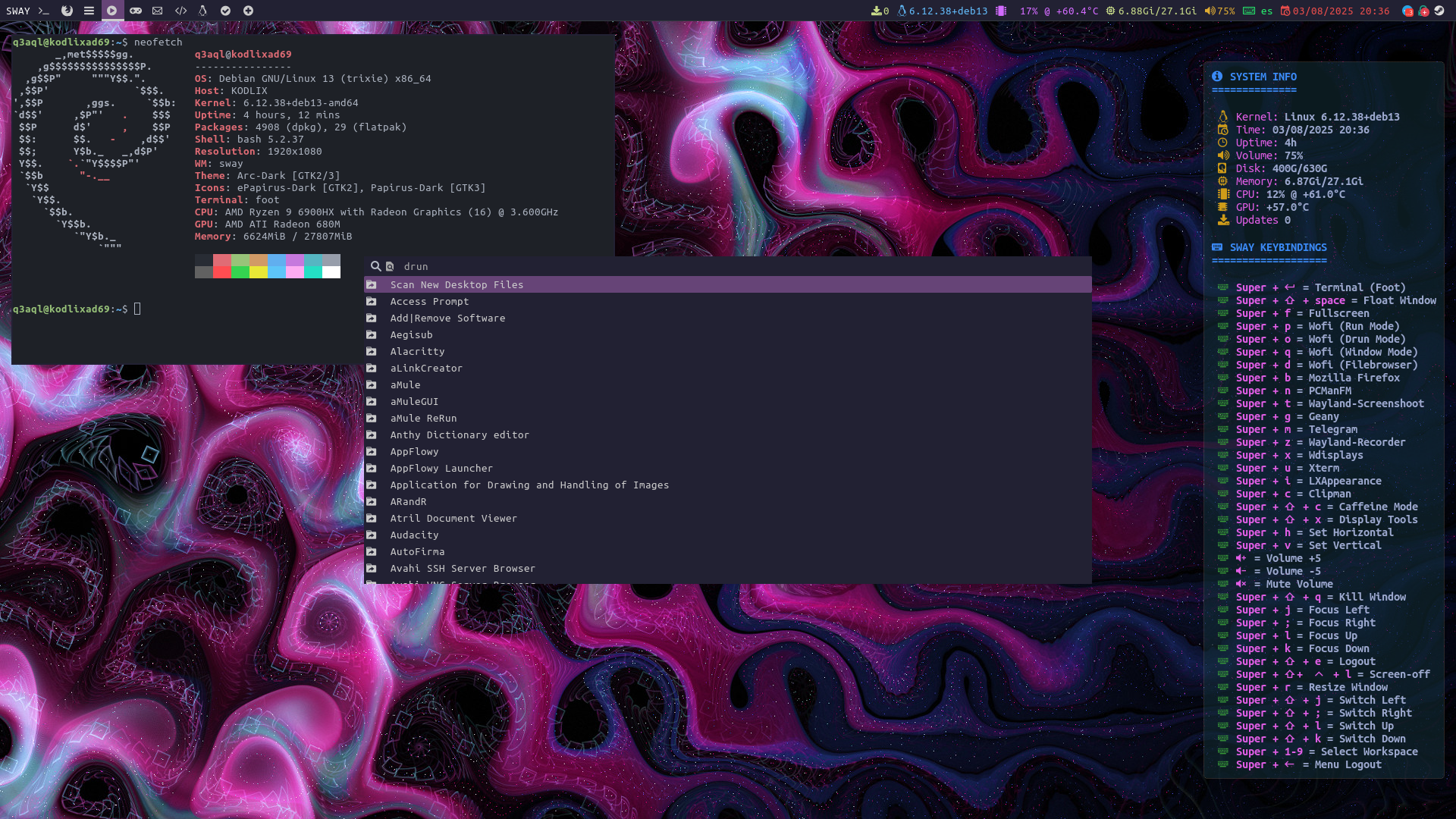
sway-wm - My tiling Sway configuration for Debian
Screenshot:
Installation:
-
Install dependencies:-
Install the packages necessary for sway to function properly:
sudo apt install sway swaylock swaybg swayidle sway-backgrounds lxappearance atril vim \
nwg-look nwg-displays python3 python3-tk python3-psutil zenity pulseaudio-utils bash wget \
pipewire pipewire-pulse slurp foot alacritty kitty wf-recorder wl-clipboard coreutils unzip \
wlr-randr wdisplays ristretto grim arc-theme papirus-icon-theme adwaita-icon-theme mpv curl \
adwaita-qt6 adwaita-qt qt5ct qt6ct wofi keepassxc wmctrl procps clipman pcmanfm jq dex git \
geany xarchiver iwd fonts-noto fonts-noto-core fonts-noto-extra fonts-noto-mono waybar \
xdg-desktop-portal-gtk xdg-desktop-portal xdg-desktop-portal-wlr fonts-liberation psmisc \
sway-notification-center xwayland
curl -L "https://gs.q3aql.dev/sway-wm/scripts/update-firefox.sh" | sudo bash curl -L "https://gs.q3aql.dev/sway-wm/scripts/update-telegram.sh" | sudo bash curl -L "https://gs.q3aql.dev/sway-wm/scripts/update-electronmail.sh" | sudo bash curl -L "https://gs.q3aql.dev/sway-wm/packages/nwg-wrapper-install.sh" | sudo bash curl -L "https://gs.q3aql.dev/sway-wm/packages/vim-conf-onedark.sh" | sudo bash curl -L "https://gs.q3aql.dev/sway-wm/packages/um-nerd-fonts.tar.gz" | sudo tar -zxvf - -C / curl -L "https://gs.q3aql.dev/sway-wm/packages/iwd-connectd.tar.gz" | sudo tar -zxvf - -C / sudo systemctl daemon-reload sudo systemctl enable iwd-connectd
-
-
Install configuration (dotfiles):-
Clone repository and copy files to your home:
git clone https://git.q3aql.dev/q3aql/sway-wm
cd sway-wm
cp -rf .config ~/
cp -rf wallpapers ~/
cp -rf scripts ~/
echo "export QT_QPA_PLATFORMTHEME=qt5ct" >> ~/.bashrc
-
Configuration:
-
Network:-
By default, I use
iwdas my network manager via theiwd-connectdscript: -
To modify the configuration, you must edit the file
/usr/bin/iwd-connectd-cfgwith root:interface="wlan0" wireless="yes" # Change to "no" for ethernet wireless_ssid="miwifiname" wireless_pass="passwordwifi" ip_interface="192.168.0.100/24" gw_interface="192.168.0.1" dns_one="1.1.1.1" dns_two="1.1.0.0" -
After modifying the configuration, restart the service:
$ sudo systemctl restart iwd-connectd
-
-
Monitor & resolution:-
The configuration load my monitor configuration:
-
Use the command
wlr-randrorwdisplaysfor show your config & edit the file~/.config/sway/startwlrrandr.sh:wlr-randr --output DP-1 --custom-mode 1280x1024@75Hz --pos 288,0 wlr-randr --output DP-2 --custom-mode 1280x1024@75Hz --transform 90 --pos 1568,0
-
-
Screensaver:-
The configuration file set the time in 20 minutes:
-
Edit the file
~/.config/sway/startwlrscreensaver.sh:# Basic configuration variables ScreensaverTime="1200" # 20 minutes
-
-
Wallpaper:-
By default, the config load wallpaper on
~/wallpapers/awesome.jpg: -
Edit
~/.config/sway/configfor set your favorite wallpaper:exec --no-startup-id "swaybg -i ~/wallpapers/awesome.jpg -m fill"
-
-
Tray:-
By default, the config set tray on monitor
HDMI-A-1: -
Edit
~/.config/sway/configfor set your output monitor:tray_output HDMI-A-1
-
-
Layout:-
By default, the config load my spanish layout.:
-
Edit
~/.config/sway/configfor set your configuration:# Input layout input * { #xkb_layout "us" xkb_layout "es" #xkb_variant "colemak" }
-
Keys configuration:
My list of extra combinations:
- Super + d = Open Wofi (fbrun mode)
- Super + p = Open Wofi (run mode)
- Super + q = Open Wofi (window mode)
- Super + o = Open Wofi (drun mode)
- Super + b = Open Firefox
- Super + n = Open PCManFM
- Super + t = Open Wayland-Screenshoot
- Super + g = Open Geany
- Super + m = Open Telegram
- Super + z = Open Wayland-Recorder
- Super + x = Open Wdisplays
- Super + u = Open Xterm
- Super + i = Open LXAppearance
- Super + c = Open Clipman
- Super + Shift + c = Caffeine Mode
- Super + Shift + x = Display Tools
- Volume-Up = Volume +5
- Volume-Down = Volume -5
- VolumeMute = Mute Volume
- Super + Ctrl + Shift + l = Screen Off/On
- Super + Shift + e = Logout
- Super + Backspace = Menu Logout